


Page Numbering
This dialog window allows us to set page numbering. The combo list allows us to define the numbering style (Arabic digits, Roman digits, using symbols). A constant text can be placed both in front and behind the page number. The "Numbering from" option allows starting the page numbering from an arbitrary number.
The "Default" button:
- Selection "Save settings as default" saves the content of the window as default for any new tasks. The default is valid for all GEO5 programs. Different computer users may have different defaults.
- Selection "Adopt default settings" adopts the default settings to any opened task, which has the different settings.
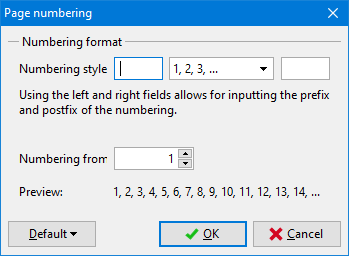 "Page numbering" Dialog window