


Partial Factors
The "Settings" dialog window allows inputing the partial factors for the analysis based on EN 1997.
The "Design approach" combo list allows us to select one of the three "Design approaches". Depending on the selected design approach, the dialog window displays the partial factors on actions, material or resistance and coefficients of combination for variable load actions.
The section for inputting partial factors on actions also enables to input partial factors reducing the action of water.
The "Settings administrator" and the "Settings list" contain a large number of pre-defined settings for individual countries EU - settings EN 1997 according to selected national annexes (NA). In most countries, only one Design approach is then specified depending on NAD and used program (a type of geotechnical task) - a larger number of pre-defined settings are available only for some countries.
The program enables to input each set of parameters four times - for individual design situations. The program then adopts the coefficients based on the design situation set in the "Stage settings" frame.
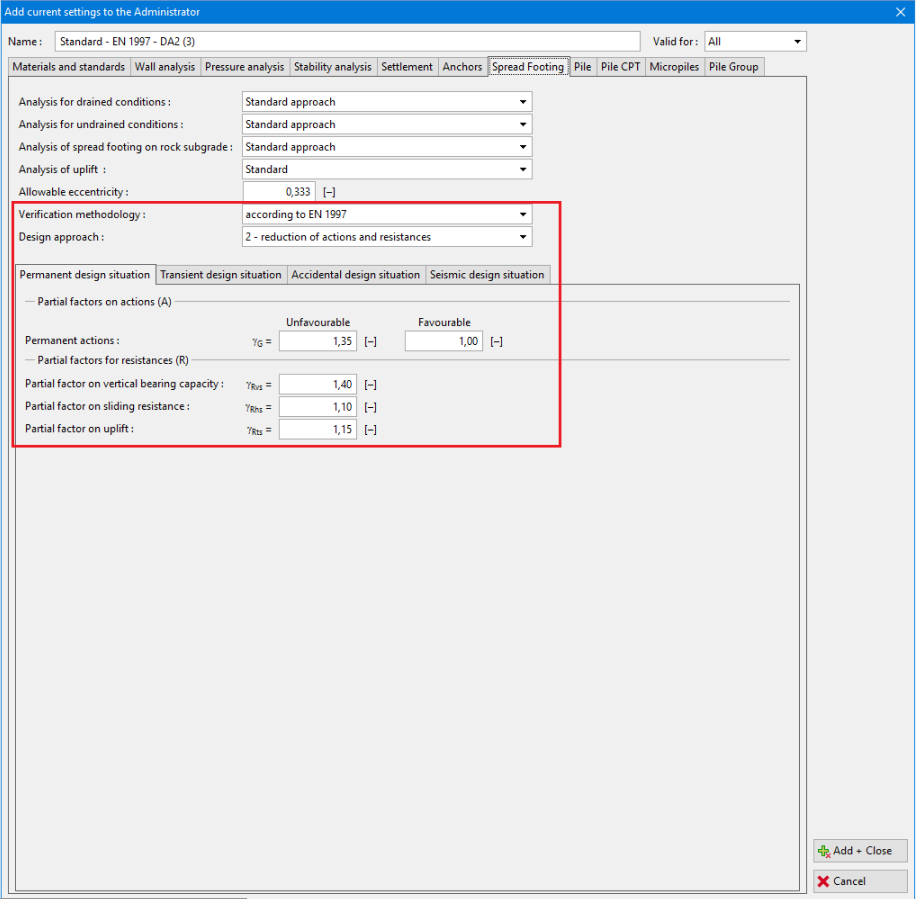 "New settings" dialog window - input of partial factors for the analysis based on EN 1997