


Anchors
The frame "Anchors" contains a table with the list of anchors. Adding anchors is performed in the "New anchors" dialog window.
The input anchors can also be edited on the desktop with the help of active objects. The program employs the following coordinate systems.
The anchor head (starting point) is automatically connected to the terrain, an arbitrary interface, or opening (tunnel lining). The anchor head is then automatically positioned into the intersection of the anchor line determined by the input points and the selected line. The anchor can also be introduced directly by specifying coordinates of the two endpoints.
In the stage of its introduction, the anchor is represented by a pair of forces applied at its endpoints and acting in opposite directions. No other loading, e.g. surcharge, excavation, etc., should be added or modified in this stage.
In the subsequent stages the anchor is represented by prestressed elastic tensile-compressive bar element with constant normal stiffness. The maximum allowable tensile force the element can sustain controls tensile failure of the anchor. The bar element is anchored into the soil only at its starting and endpoints. No mutual interaction between the soil and the anchor along the anchor length is considered.
Anchors are defined by their starting and end points and by their stiffness. The program automatically links the anchor element degrees of freedom to the actual degrees of freedom of the predefined finite element mesh. Therefore, the anchor can be introduced anywhere in the structure.
The anchor stiffness is specified in terms of the elastic modulus and its area. The program makes it also possible to enter the anchor diameter - the area is then determined automatically. In stability analysis problems the anchor stiffness is not considered. Its action is realized only through the prestress force introduced automatically as an external compressive force acting at the anchor head.
Other important parameters are the prestress force and the tensile strength (the anchor breaks when the tensile strength is exceeded). For elements with no prestress the prestress force is set equal to zero. A sufficiently large value of the anchor tensile strength may be specified to avoid anchor failure.
By default the anchor does not support a compressive force - anchor elements loaded in compression during a certain stage of calculation are temporarily disabled. If tension occurs in subsequent analysis run (due to change in load, geometry or material parameters of soil), the program automatically introduces these elements back into the analysis. The program makes also possible to include a compressive response of the anchor. However, for elements loaded primarily in compression we recommend defining these elements as props.
The anchor deforms during analysis. Such deformation together with the deformation of the surrounding soil may cause a change of the current tensile force in the anchor. Providing we wish to modify the tensile force in the anchor to a specific value we can post-stress the existing anchor to a given value in arbitrary subsequent calculation stage.
In subsequent stages the program allows only for anchor post-stressing - change of the initial prestress force, or for removing the anchor from the analysis. The other anchor’s properties like the geometry, stiffness or strength cannot be modified.
Introducing pre-stressed anchors into the soil may lead to plastic deformation of the soil in the vicinity of the anchor head or root. Some modifications of the original input are then required to avoid often encountered loss of converge.
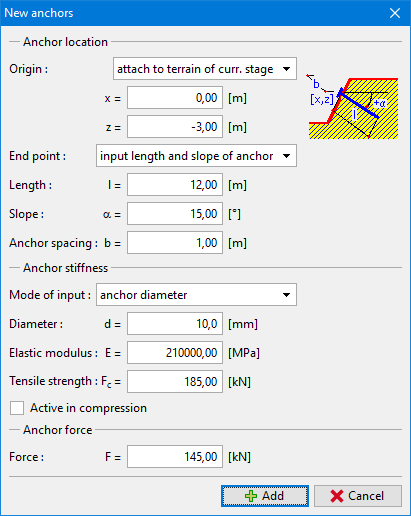 Anchor input