


Contacts and Beams (Water Flow)
The frame "Contacts" ("Beams") contains (in mode "Water flow") a table with the list of contacts (beams). Adding contacts (beams) is performed in the "New contacts" ("New beams") dialog window.
The contact location is selected from the combo box (mesh line, terrain segment).
The contact elements are used in applications that require a proper representation of structure-soil interaction. They can be further used to model joints or interfaces of two distinct materials (soil - rock interface). Contacts are assigned to already defined lines - free lines or mesh lines (interfaces). The contact is defined by its type.
The input contacts can also be edited on the desktop with the help of active objects.
Beam or contact element can be defined as:
- permeable
- impermeable
- partially permeable
Contact elements allow us to model a certain barrier for flow in the soil body. Consider for example a sheeting wall represented in the stress analysis by beam elements. The sheeting wall anchored into the inside region can be considered either as fully permeable, or fully impermeable or partially permeable. Although the first two cases can also be treated using contact elements placed along the corresponding line, they are handled by the program automatically without needing these elements. The third case represents a problem of flow in a thin zone having a given thickness d, see figure:
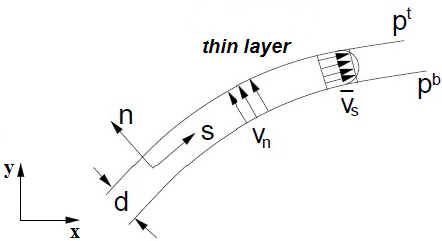 Partially permeable contact
Corresponding fluxes in the tangent direction (s-direction) qs and normal direction (n-direction) qn are given by:
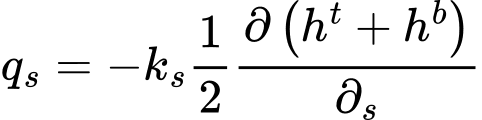

Defining contact elements, therefore requires inputting the following parameters:
ks | - | permeability in tangent direction (permeability longitudinal), [m/day] |
kn | - | permeability in normal direction (permeability transverse), [m/day] |