


Using the Help
The contextual help for all GEO5 programs is displayed in a standard dialog window. Help can either be launched by directing through the program menu (items "Help", "Content"), or by pressing the "F1" button anywhere in the program.
Some dialog windows (e.g. "Add new soils") allow opening a corresponding chapter of the Help by pressing the help button " ".
".
The dialog window contains:
- A toolbar with basic control buttons. The "Print" button opens the print dialog window. The ("Back/Forward") buttons allow listing through pages, which have been recently opened. The "Previous/Next" buttons allow listing through pages in the "Tree" up and down.
- Input field "Search".
- "Tree", which contains the list of Help items - individual items in the tree are opened/closed by clicking the symbols "
 "/"
"/" " in front of the name.
 - The window for displaying the help - the window header contains the name of the currently shown page.
The text of each help contains further cross-references to other items. The text of these references is colored in green.
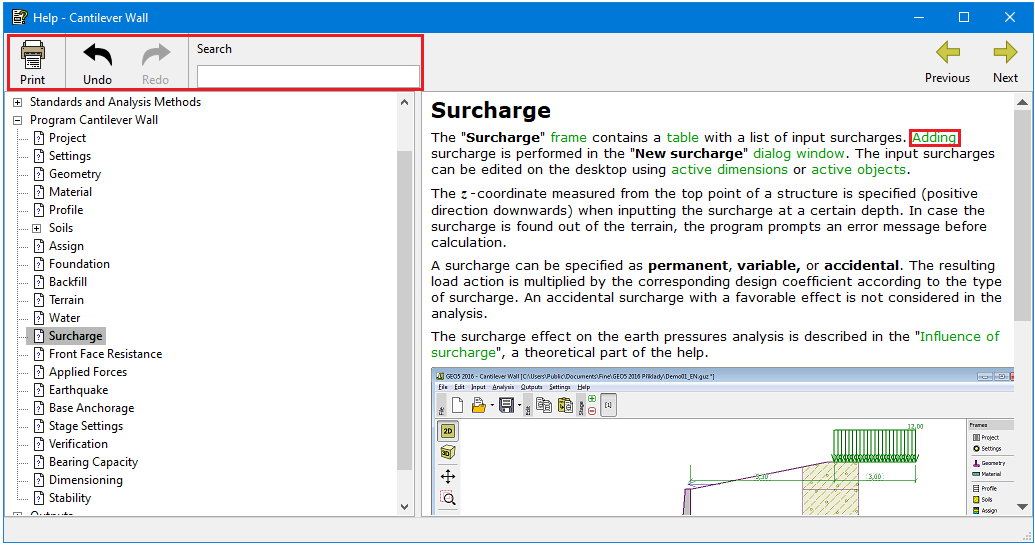 "Help - GEO5" dialog window