On-line contextual Help
/
FEM
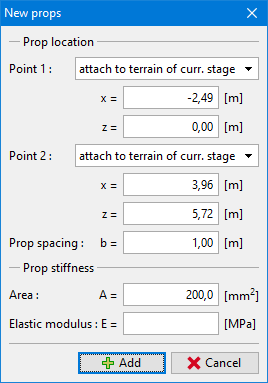
The frame "Props" contains a table with the list of anchors. Adding (editing) props is performed in the "New props" dialog window ("Adjust prop properties").
Props can also be introduced using the mouse. This inputting mode is activated by clicking an appropriate button on the horizontal tool bar "Props". The following modes are available:
|
By clicking the left mouse button on the desktop we define the starting and the end point of a prop. Exploiting the function of grid may simplify this step. |
|
Clicking the left mouse button on already existing prop opens the "Adjust prop properties" dialog window, which allows for modifying its parameters. |
|
Clicking the left mouse button on already existing prop opens the prop removal dialog window – accepting this action removes the selected prop. |
The inputted props can also be edited on the desktop with the help of active objects. The program employs the following coordinate systems.
The prop end points can be automatically hooked to the ground, an arbitrary interface or opening (tunnel lining). These points are then automatically positioned in to the intersections of the prop line determined by the inputted points and the selected lines. The prop can also be introduced directly by specifying coordinates of the two end points.
Props are represented by elastic compressive bar element with constant normal stiffness. The props can sustain only compressive loading. When found in tension they are removed from the analysis.
The prop is linked to the finite element mesh in its two end points. No interaction is considered between the soil and the prop along its length when places into the soil.
Props are defined by their starting and end points and by their stiffness. The program automatically links the prop element degrees of freedom to the actual degrees of freedom of the predefined finite element mesh. Therefore, the prop can be introduced anywhere in the structure.
The prop stiffness is specified in terms of the elastic modulus and its area. The program makes also possible to enter the prop diameter – the area is then determined automatically.
In subsequent stages the prop cannot be edited – it can be either removed or inputted again.
Prop input
Frame "Props"
Language: english
Company Fine develops structural engineering software with main focus on geotechnical software and structural engineering analyses.
A Fine építőmérnöki szoftvereket fejleszt, elsősorban statikai és geotechnikai programokat.
Společnost Fine se zabývá vývojem stavebního software, zejména programů na statické výpočty, zakládání staveb a geotechniku.
Η εταιρεία Fine αναπτύσσει λογισμικό για πολιτικούς μηχανικούς και ειδικά για γεωτεχνικά θέματα και δομοστατικά θέματα.
Компания Fine занимается разработкой строительного программного обеспечения, особенно программ для расчета статики и геотехнических программ.
شرکت Fine توسعه دهنده نرم افزار های مهندسی عمران با نگاه ویژه به نرم افزار های ژئوتکنیک و تحلیل های سازه ای مهندسی می باشد.
Fine es una compañía que desarrolla y suministra programas de ingeniería civil especializada en programas geotécnicos y de estructuras.
Fine je Češko podužeće koje razvija i dobavlja konstrukcijske i geotehničke programe. Trenutno tvrtka nudi više od 50 pojedinačnih programa za rješavanje zadataka za statiku, dizajn konstrukcija, temeljenja i geotehnike.