


Reinforcements
The frame "Reinforcements" contains a table with the list of reinforcements. Adding reinforcements is performed in the "New reinforcements" dialog window. When inputting, it is possible to use the function of the grid.
The input reinforcements can also be edited on the desktop with the help of active objects. The program employs the following coordinate systems.
The reinforcement endpoints are automatically connected to the terrain, an arbitrary interface, or opening (tunnel lining). These points are then automatically positioned into the intersections of the prop line determined by the input points and the selected lines. The reinforcement can also be introduced directly by specifying coordinates of the two endpoints.
Reinforcements are tensile reinforcing elements (geotextiles, geodrids), which are defined by their starting and endpoints and their stiffness.
Unlike anchors or props, the reinforcement is linked to an underlying finite element mesh along its entire length. However, similar to anchors the program introduces the reinforcement endpoints into the finite element mesh automatically so the reinforcement can be specified anywhere within the mesh. Similar to anchors the reinforcement is modeled by a tensile/compressive bar element with the possibility of transmitting only normal force. Owing to its geometrical characteristics, the reinforcement calls for the input of the cross-sectional stiffness taken per 1 m (foot) run of its width. The user should contact the manufacturer for this information.
In subsequent stages the reinforcement cannot be edited - it can be only removed.
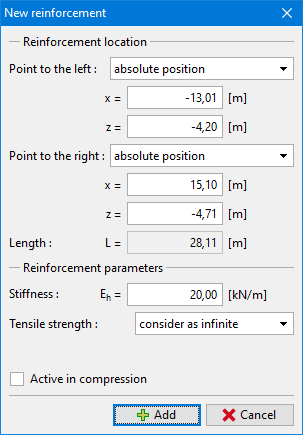 Reinforcement input
The program allows us to consider the reinforcement also in compression - by default, however, the part of reinforcement found in compression is disabled for the analysis. This state is simulated in the figure showing the distribution of normal tensile forces overactive parts of individual reinforcements. The compressive part of the reinforcement is temporarily excluded from the analysis. Similar to anchors, however, it can be automatically activated once loaded again in tension.
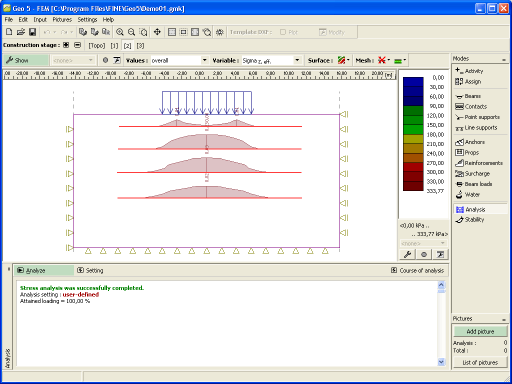 Tensile stress in reinforcements