


Drawing Settings
The "Drawing Settings" frame is used to set the parameters of the visualization (what is showed on the desktop). In any frame, it is possible to switch to the "Drawing Settings" mode, just by clicking the button on the "Visualization" toolbar.
 Button of drawing settings
Individual columns in the window correspond with the individual frames. On the left, there is always the settings for the current frame (frame "Water" on the figure). In other columns, visualization of other objects is defined. It is possible to set visualization only of the currently viewed objects.
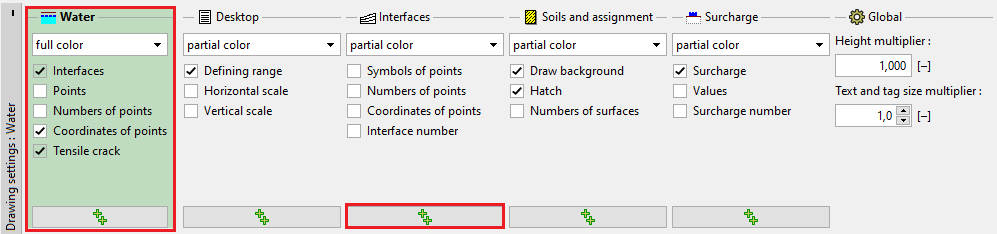 Frame "Drawing Settings"
The "Use everywhere" button in the bottom part of each column sets the defined parameters of visualization to all frames.
The "Default settings" button sets all the parameters back to default.
The settings in this frame serves mainly for defining parameters of the visualization on the desktop - the settings of parameters of drawing for outputs (print) are defined in the "Add Picture" mode.
The frame can also contain columns with special settings, which are only displayed in several cases in some programs:
- Visualization settings of analysis results (1).
- Desktop (2D programs) - defines several special settings (defining range, scale) and are global settings for all frames (2).
- Global - Height multiplier (2D programs) - enables change of scale in the vertical direction (z) (3).
- Global - Stretch Drawing (1D programs) - enables change of scale in the horizontal direction (x) (3).
- Global - 3D width - defines the width of the visualized structure in 3D visualization mode (3).
- Store views (programs Settlement, FEM) (4).
Settings of background colors, styles of lines, and fills are defined for all programs in the "Drawing Styles Administrator".
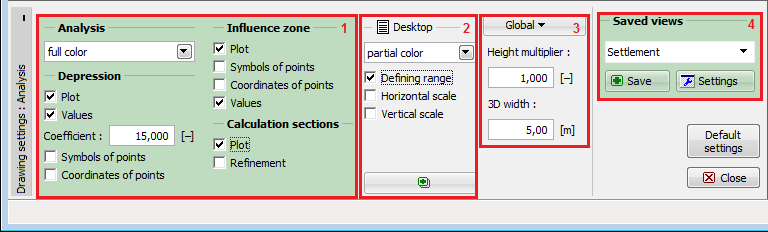 Frame "Visualization Settings" - special settings