


Drawing Styles Administrator
The Drawing styles administrator enables globally to set the picture styles (colors of displayed objects, colors of lines, line styles, filling styles, selections colors). The dialog window is available from the menu (items "Settings", "Drawing style"). The user can define the style of visualization on the desktop or in the outputs for all GEO5 programs.
The style of the structure visualization is defined in the "Desktop" and "Pictures" combo lists.
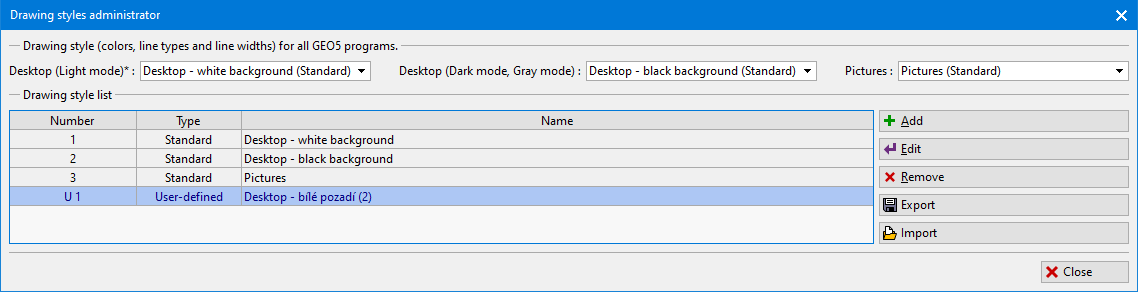 "Drawing styles administrator" dialog window
The program contains three predefined drawing styles - two for desktop visualization (black and white background) and one for pictures. There is a possibility to input user-defined drawing styles, too.
How to create a user-defined Drawing style:
Select one of the styles in the "Drawing style list".
Press the "Add" button - then the "Add drawing style" dialog window will open.
In the "Show settings for the program" combobox it is possible to filter modes according to individual programs or show modes for all GEO5 programs.
In the box "Name" input the name of a new settings.
In the "Mode" list (left part of the window) select the mode (e.g. Applied forces, Backfill, Base anchorage...), in which you want to change the style of drawing. In the right part of the window input, new drawing styles of objects in selected mode (e.g. Water tables, Dimensions, Gradient...).
The list of affected GEO5 programs is shown in the bottom part of the window.
Example: If we change drawing style (color, line type, thickness) of "Tensile crack" (mode Water) in the Cantilever wall program, the new settings will be valid for all programs in the list in the bottom part of dialog window ("Abutment", "Anti-slide pile", "Beam"....). New settings will be stored by pressing the "OK" button. These new settings will be added to the "Drawing style list" and will be available in the "Desktop" and "Pictures" combo lists. After adding a new style, it is necessary to select it in the corresponding combo list for visualization on the desktop or print.
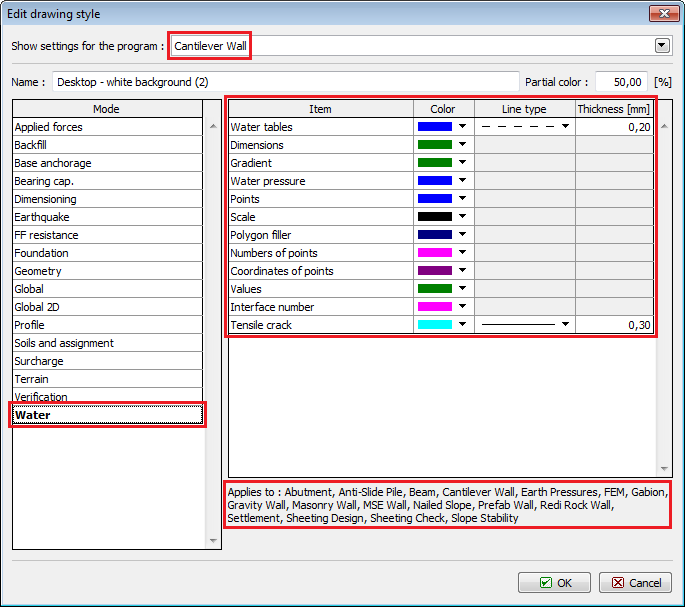 "Add drawing style" dialog window