


Input and Edit of Soils
In the "Add new soil" dialog window, we input the name of a soil and parameters that should be obtained from laboratory measurements or geological surveys.
All input fields in the window are mandatory. The only exception is the value of γsat (unit weight of saturated soil) in the section "Uplift". If this field remains empty, the program automatically adds the value of γ (unit weight of soil).
The Hint button " " provides information about the theory of analyses linked to individual input values.
The Color and pattern category of soil can be set in the combo lists in the right part of the dialog window.
It is possible to search for a specific pattern in each category using a number of patterns (e.g. GEO category - Clay pattern - number 4).
If no geological survey or laboratory experiments are available, the soil can be specified with the help of the soil database containing approximate values of basic characteristics. The "Classify" button opens the "Classification of soils" dialog window with values offered to insert into the window. The "Delete" button allows removing information about classified soil from the catalog. Soil parameters that do not appear in the catalog ("Friction angle structure-soil" in the picture) must be assigned manually in any case. The characteristics of rocks is not listed in the implemented database, these parameters must also be defined manually. Approximate parameters of rocks are presented in the theoretical part of the Help (for calculation of rock stability or for analysis of bearing capacity of foundation on bedrock).
The specified soil is added onto the list of soils by pressing the "Add" button.
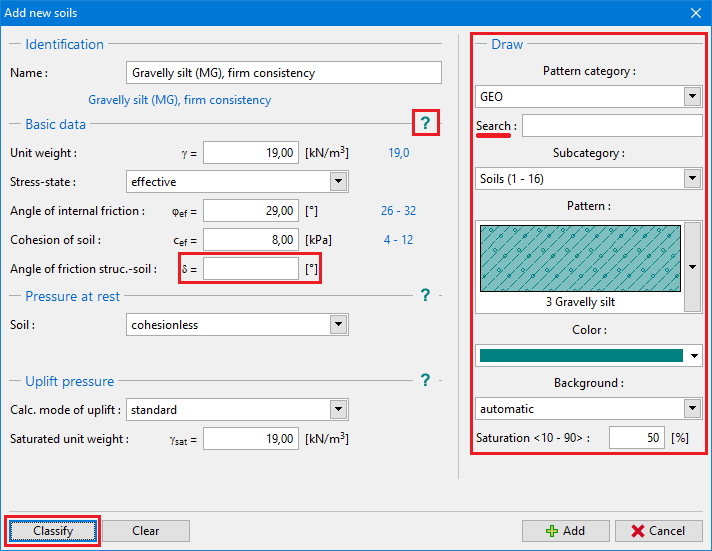 "Add new soils" dialog window