


Settings
The "Settings" frame allows us to introduce the basic settings of the program, such as standards and theories of analysis, the way of proving the safety of a structure, and individual coefficients of the analysis.
The programs not only contain the pre-defined basic Settings for individual countries, but also allow the user to create user-defined Settings, which can be subsequently used in all GEO5 programs.
The "Select" button allows us to choose an already created setting from the "Settings list".
The "Settings Administrator" button opens the "Administrator" dialog window, which allows for viewing and modifying individual Settings. It is also possible to identify the visible settings in the Settings list. Data in the Settings administrator can also be exported and imported.
The "Add to the administrator" button allows us to create user-defined Settings, which are subsequently added to the Settings administrator.
The "Modify" button enables a quick visualization and editing of the current Setting in the opened program. Modifying any of the parameters changes the title to "Input for the current task". Individual analyses are then performed with this local setting. Should we consider this setting as suitable also for other tasks, we add the setting into the "Settings administrator" by pressing the "Add to the administrator" button.
The "Input for the current task" setting is usually created when importing older data.
Settings of analysis parameters are performed in the "Materials and standards" and "Wall analysis" tabs.
The type of structure has to be selected in this frame.
It is also possible to select the type of block face that affects the block weights - this information can be found in the output protocol.
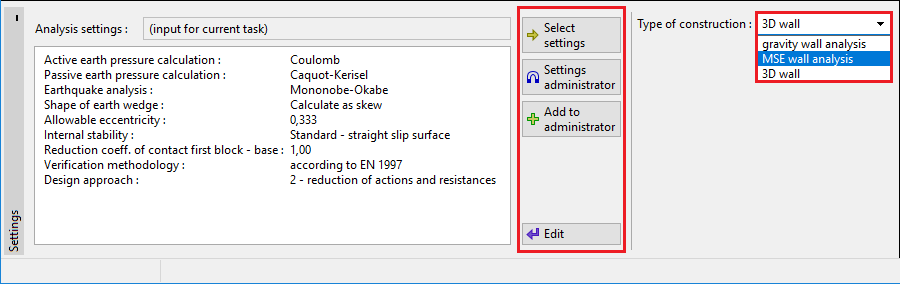 "Settings" frame