


On-line contextual Help

/

Rock Stability 

GEO5

Geotechnical software

« Back to Help

Options – copy to clipboard

The "Copy to clipboard" tab sheet allows for setting the controlling parameters:

Picture size
  • the setting defines the picture size. Either the picture width or height can be assigned manually. The other dimension is always set automatically
Picture format
  • the setting defines the picture format (*.EMF, *.WMF, *.BMP), its resolution and color. Recommended setting is displayed in the figure (format: *.EMF, resolution: 600 dpi, color)
Options
  • the setting defines the picture frame and header. If both options are checked, the picture contains both the frame and header

The "Default" button in the window sets original implicit values.
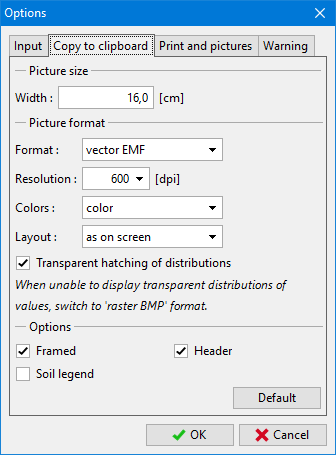
Dialog window "Options" – tab sheet "Copy to clipboard"Dialog window "Options" – tab sheet "Copy to clipboard"


Language: english