


Before you contact our technical support, please install the latest version available for you.
Older GEO5 versions (2024 and earlier) might display error "0x80090006" during installation. Download “GEO5 Installation - 2024 and older” from our website to proceed.
Problems still persist?
Premium Hotline
Technical telephone support is provided to all GEO5 subscribers.
Telephone Fine hotline: +420 233 089 494 (Czech Republic), please consider the working hours: Monday - Friday from 9:00 to 16:00 (CET), or call your local reseller.
The technical support staff will request your:
- License number
?
How do I find my license number?
- Run any program made by Fine
- In the main menu, click “Help”
- Select “About program”
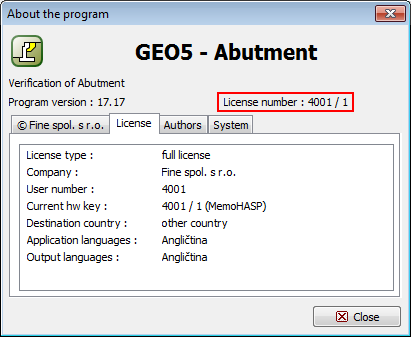
- Software version
?
How do I find my software version number?
- Run any program made by Fine
- In the main menu click on folder “Help”
- Select “About program”
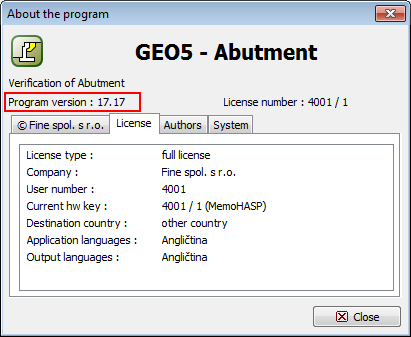
- Problem description
?
What should I include in the problem description?
In order to receive prompt and adequate support, it is necessary to include answers to the questions below in the problem description:
- When does the problem occur?
- What steps cause the problem?
- Does the problem occur only in this task or during any other operation?
- What operating system is installed on your computer?
- What kind of hardware do you use (processor, memory, printer)?
- Do you use other hardware or software that could be related to the error?
- Data containing the error
?
Attach Data Files (*.g..)
It is crucial for us to receive your Data Files with the error.
- Attach Data Files with GEO5 file extension (*.g.. )
Technical support by email
Basic technical support is provided to all our customers through the Contact Form for free.
Technical support is provided to users of the current Edition and to users of the two Editions previously released.
Software Upgrades
The latest upgrades are always available for free to all GEO5 subscribers.
FAQ
Check the frequently asked questions regarding licensing.