On-line contextual Help
/
Settlement
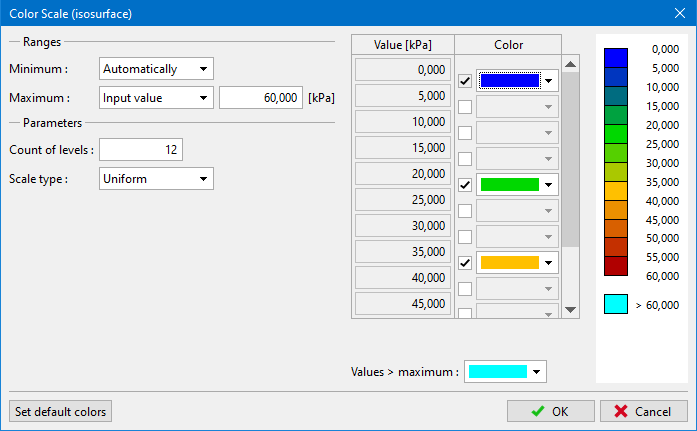
The "Scale color definition" dialog window serves to create a user-defined color scale.
The "Floating minimum and maximum" check box determines the basic type of a scale. If checked, the minimum and maximum values of a scale are automatically adjusted whenever the corresponding variable or a construction stage is changed. In such a case it possible to adjust the following:
|
|
|
The number of scale levels and scale type are specified in the "Scale generation" dialog window, which opens after pressing the "Generate values" button. It is possible to adjust both values and colors in the table in the left part of the dialog window. The range values can be easily changed in the table. If the box in the "Control color" column is checked, it is possible to choose an arbitrary color from the combo box. The color on intermediate not checked rows are automatically blended from the inputted colors in checked rows. The default values can be recalled anytime after pressing the "Predefined colors" button.
An important property of the program is a definition of ranges with the fixed minimum and maximum. If the "Floating minimum and maximum" check box is not checked, the color range is fixed and its minimum and maximum values are inputted. As oppose to the moving range it is further possible to specify:
|
|
When changing a variable or a construction stage the color range remains still the same, keeping the same end ranges. The values found outside the range (below the minimum or above the maximum value) are drawn using colors specified in the right part of the window. The minimum and maximum range values are inputted in the "Scale generation" dialog window. The inputted minimum and maximum values are linked to the same unit – e.g. when specifying the rage of 0-200 kPa, this range is kept the same for all variables being specified in kPa – when changing the currently displayed variable to the variable settlement, the current range is switched to that corresponding to the unit of settlement.
For both the fixed and floating scale it is possible to choose whether the colors in the ranges are distributed uniformly or across zero. The "Uniform" scale means that colors are smoothly spread from the minimum to the maximum value of the scale. The "Across zero" scale draws the colors above the selected value using warm colors (yellow, red), while cold colors (green, blue) are used to represent the colors below the selected value.
Dialog window "Scale color definition"
Language: english
Company Fine develops structural engineering software with main focus on geotechnical software and structural engineering analyses.
A Fine építőmérnöki szoftvereket fejleszt, elsősorban statikai és geotechnikai programokat.
Společnost Fine se zabývá vývojem stavebního software, zejména programů na statické výpočty, zakládání staveb a geotechniku.
Η εταιρεία Fine αναπτύσσει λογισμικό για πολιτικούς μηχανικούς και ειδικά για γεωτεχνικά θέματα και δομοστατικά θέματα.
Компания Fine занимается разработкой строительного программного обеспечения, особенно программ для расчета статики и геотехнических программ.
شرکت Fine توسعه دهنده نرم افزار های مهندسی عمران با نگاه ویژه به نرم افزار های ژئوتکنیک و تحلیل های سازه ای مهندسی می باشد.
Fine es una compañía que desarrolla y suministra programas de ingeniería civil especializada en programas geotécnicos y de estructuras.
Fine je Češko podužeće koje razvija i dobavlja konstrukcijske i geotehničke programe. Trenutno tvrtka nudi više od 50 pojedinačnih programa za rješavanje zadataka za statiku, dizajn konstrukcija, temeljenja i geotehnike.